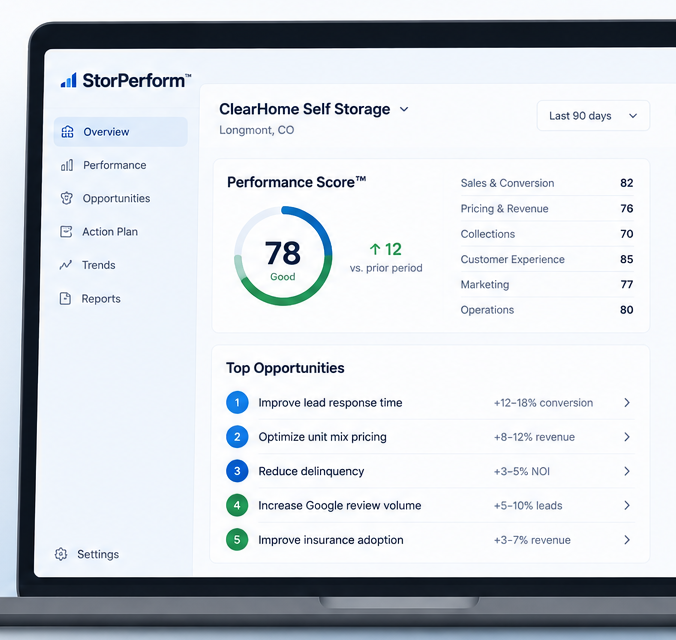
Investor Demo: This MVP demonstrates the core loop: facility data → 100-point performance score → prioritized opportunities → recommended actions → 30-Day Action Plan. Demo values are illustrative and are not customer results.
StorPerform™ / Working MVPClearHome Self Storage

ClearHome Self Storage

DEMO DATA
Illustrative completed facility demo • Explore the full StorPerform workflow without completing the audit first.

StorPerform Score™

Developing
74 / 100

Complete the Performance AuditTM to calculate the score.

92%
38%
4.8%
56%

Priority Snapshot

MVP behavior: the score is calculated locally from defined rules. Opportunities are generated from KPI thresholds and Performance Audit responses. No AI is required to produce the score.

Facility Data

Enter your facility's operating metrics. Changes save automatically in this browser.

ClearHome Self Storage

Enter the operating metrics used to calculate your StorPerform Score.
0 of 12 fields completed0%
Complete the facility data to continue.

Facility & Occupancy

Basic facility information and occupancy metrics
Current number of occupied units
Calculated from Unit Count − Occupied Units
Calculated from Occupied Units ÷ Unit Count
New Google reviews received this month

Unit Type Occupancy

Track occupancy by unit size and storage type
5×10Occupancy by type
%
%
10×10Occupancy by type
%
%
10×20Occupancy by type
%
%
10×30Occupancy by type
%
%
Enter the current physical occupancy percentage for each unit type. These values are saved with the facility record for unit-level analysis.

Sales & Collections

Sales performance and payment metrics
Total leads received month to date
Total move-ins month to date
Total move-outs month to date
Calculated from Move-Ins MTD − Move-Outs MTD
$
Current monthly rental revenue
$
Calculated from Current Rental Revenue ÷ Occupied Units
Percentage of leads that convert to rentals
Percentage of accounts past due
Percentage of tenants on autopay
Percentage of leads contacted within 24 hours
How complete and reliable is your data?

Pricing & Market

Compare asking rates with the local competitive median by unit type
5×10 Drive-UpExterior-access unit
$
$
5×10 Indoor Climate-ControlledInterior climate-controlled unit
$
$
10×10 Drive-UpExterior-access unit
$
$
10×10 Indoor Climate-ControlledInterior climate-controlled unit
$
$
10×20 Drive-UpExterior-access unit
$
$
10×20 Indoor Climate-ControlledInterior climate-controlled unit
$
$
10×30 Drive-UpExterior-access unit
$
$
10×30 Indoor Climate-ControlledInterior climate-controlled unit
$
$
Scroll horizontally to view all unit types
StorPerform analyzes all eight unit types together. Once every unit type has occupancy, asking rate and competitive median data, the two pricing checkpoints in the Revenue & Pricing section of the Performance AuditTM are calculated automatically.

Performance AuditTM

43 scored checkpoints across six operating categories. Enter points earned and the confidence level of the supporting evidence.
0.0 / 100Performance Audit incomplete
0 / 43Blank scores remain unassessed
0 / 100Based on completed checkpoints
Always / Sometimes / Never
Scoring: Performance Score is the sum of points earned. All checkpoint maximums total 100 points. Select the rubric description that best matches current performance. StorPerform assigns the corresponding points automatically. Evidence Confidence documents how strongly each score is supported and does not alter the points earned.
Evidence Confidence: Always = the checkpoint is consistently demonstrated in normal operations; Sometimes = the checkpoint is demonstrated inconsistently or only in some situations; Never = the checkpoint is not currently demonstrated in normal operations.

Performance ScoreTM

Executive summary of the completed Performance AuditTM and the most important findings.

Top Priorities

The five highest-priority actions identified from facility data and Performance AuditTM results.

30-Day Action Plan

Generate accountable actions directly from the current Top 5 Opportunities.
0
0
0
0%
No actions yet. Generate the plan from the Top 5 Opportunities.

Performance Report

A print-ready management report with facility results, Top Priorities, and implementation checklists.